
In today’s competitive business landscape, 94% of employees spend significant portions of their time on repetitive manual processes that could be automated. Automation targets these inefficiencies by allowing organizations to automate manual tasks, freeing team members to focus on more important work. While you’re reading this article, countless businesses are already leveraging automation technology to eliminate mundane tasks, reduce costs by 20-30%, and boost productivity by up to 40%. The question isn’t whether automation can improve business efficiency—it’s how quickly you can implement it to stay competitive.
Business process automation represents one of the most significant opportunities for operational improvement available to modern organizations. From automating routine tasks like data entry and invoice processing to implementing sophisticated workflow automation tools, companies across industries are discovering that automation initiatives deliver measurable results within months of implementation. Automating tasks allows businesses to allocate more time to strategic activities that drive growth. By enhancing efficiency, automation simplifies workflows, reduces manual effort, and improves overall organizational performance.
This comprehensive guide will show you exactly how automation can transform your business operations, the specific areas where automation drives maximum efficiency gains, and the practical steps to implement automation solutions that deliver real ROI. Automation has been shown to significantly improve employee well-being by reducing burnout. Whether you’re looking to streamline existing systems or completely reimagine your current business processes, automation can also help streamline tasks, making operations more efficient and reducing errors. You’ll discover actionable strategies that leading organizations use to improve operational efficiency through intelligent automation.
What is Business Automation and How Does It Boost Efficiency
Business automation refers to the use of technology—particularly software and artificial intelligence—to handle repetitive tasks, routine processes, and rule-based activities without requiring human intervention. At its core, automation technology transforms manual processes into automated systems that can execute work with greater speed, consistency, and accuracy than traditional manual methods. Standardized automated workflows ensure tasks are performed identically every time, creating clear audit trails and helping to reduce errors by minimizing human mistakes and improving data accuracy.
The efficiency boost from automation happens immediately through several key mechanisms. First, automated processes eliminate the time lag inherent in human task switching and decision-making. While a human employee might take several minutes to process a single invoice, automated systems can handle hundreds of invoices in the same timeframe. Second, automation enables 24/7 operations—automated workflows continue processing tasks even when your team goes home, effectively extending your business hours without increasing labor costs. Automation allows employees to focus on higher-level, more meaningful work.
Research shows that 50% of current work activities can be automated using existing technologies like robotic process automation (RPA) and workflow automation tools. This statistic isn’t theoretical—companies implementing business automation are seeing dramatic improvements in their operations. Generative AI is increasingly used to write software code, develop marketing strategies, and analyze documents. TomTom, for example, resolved IT incidents 50% faster after implementing automation technology, while organizations using AI-powered automation report processing time reductions of up to 70-90%.
The immediate efficiency impact extends beyond just speed improvements. Automated systems create standardized workflows that eliminate process variations, reduce human error rates by up to 90%, and free up your team’s time for higher-value strategic work. When you automate repetitive tasks, you’re not just making existing processes faster—you’re fundamentally changing how your organization allocates human resources and manages operational capacity.
5 Key Ways Automation Dramatically Improves Business Efficiency
Automation transforms business efficiency through five core mechanisms that directly impact your bottom line. By automating routine and time-consuming processes, businesses enable employees to focus on critical tasks that drive growth and innovation. These improvements compound over time, creating sustainable competitive advantages for organizations that embrace automation tools strategically.
Eliminates Time-Consuming Repetitive Tasks
The most immediate efficiency gain from automation comes from eliminating repetitive processes that consume disproportionate amounts of employee time. These are often time consuming tasks such as manual data entry, scheduling, reporting, and other administrative workflows. Research indicates that 94% of employees spend significant portions of their workday on manual tasks like data entry, scheduling, reporting, and administrative workflows. These activities, while necessary, add minimal strategic value to your organization.
Automation solutions can free up to 30% of workers’ time by 2030, redirecting human capacity toward creative problem-solving, customer relationship building, and strategic planning. Consider the impact of automating routine tasks across common business functions:
- Invoice processing: Instead of manually entering vendor information, line items, and approval routing, automated systems can extract data from invoices, validate against purchase orders, and route for approval in seconds
- Payroll calculations: Automated payroll systems eliminate manual timesheet compilation, tax calculations, and direct deposit processing while ensuring compliance with changing regulations
- Inventory tracking: Real-time automated inventory management eliminates manual stock counts and automatically triggers reorder points based on demand patterns
The time savings compound across your organization. Businesses report saving over 6 hours weekly just from automating social media tasks—imagine the impact when you apply automation to core operational processes. One organization documented saving 40 hours monthly by automating just 40 daily operations, demonstrating how small-scale automation initiatives create substantial efficiency gains. Implementing process automation can be tricky, especially if employees are reluctant to use new systems or the integration doesn’t go smoothly.
Reduces Costly Human Errors
Human error costs the U.S. economy approximately $600 billion annually, making error reduction one of the most compelling financial arguments for business automation. Manual processes inevitably contain errors due to fatigue, distraction, and the inherent limitations of human attention spans during repetitive work.
Automation minimizes mistakes in data entry, calculations, and process execution by eliminating human variability from routine operations. For example, automating financial transactions ensures that payments, transfers, and reconciliations are processed accurately and securely, reducing the risk of costly errors and fraud. Automated systems follow programmed rules consistently, creating predictable outcomes that improve quality while reducing rework costs. Machine learning capabilities take this further by extracting accurate data from invoices and documents, even when formatting varies or information is partially illegible.
Manufacturing processes demonstrate automation’s error-reduction power most clearly. Automated production lines maintain consistent quality standards, reduce safety incidents, and eliminate the variability that comes from manual assembly processes. One automotive manufacturer achieved a 15% reduction in defect rates simply by automating quality control inspections that previously relied on visual human inspection.
The financial impact extends beyond direct error costs. Reducing errors improves customer satisfaction, eliminates compliance violations, and reduces the labor costs associated with fixing mistakes. Organizations implementing automation report error rate improvements from 20% down to 5% or lower, representing substantial cost savings and operational improvements.
Accelerates Decision-Making and Response Times
Automation tools analyze large datasets faster than humans, providing rapid recommendations that accelerate business decision-making. Where human analysis might take hours or days to process complex information, automated analytics detect trends immediately and at scale, enabling faster responses to market opportunities and operational challenges.
Real-time data processing capabilities transform how quickly organizations respond to customer needs and market changes. Automated systems provide 24/7 client access via mobile apps and web portals, ensuring customers receive immediate responses regardless of business hours. This constant availability creates competitive advantages in industries where response time directly impacts customer retention and satisfaction.
The acceleration effect extends to internal operations as well. Automated approval workflows route requests instantly to appropriate decision-makers, eliminating delays caused by manual routing and availability issues. Deal closure times improve when automated systems provide immediate access to customer data, pricing information, and contract templates, enabling sales teams to respond to opportunities without administrative delays.
Financial visibility improves dramatically with automated reporting systems that provide real-time dashboards and performance metrics. Instead of waiting for monthly reports, business leaders can access current operational data instantly, enabling proactive adjustments that prevent problems before they impact performance.
Standardizes Workflows for Consistent Results
Seventy-six percent of businesses use automation to standardize workflows and reduce process variations that create inefficiencies and quality problems. Manual processes naturally evolve differently across departments and individuals, creating inconsistent outcomes that complicate management and reduce predictability. A robust Business Process Management program is essential for a successful Digital Transformation initiative, as it provides the structure and oversight needed to ensure automation efforts align with organizational goals and deliver measurable results.
Automated workflows eliminate this variability by enforcing standardized processes across your entire organization. Automated approval processes ensure every request follows the same routing rules and approval criteria, regardless of who initiates the process or when it occurs. Task assignment automation distributes work according to predefined rules, ensuring balanced workloads and consistent turnaround times.
Quality control benefits substantially from workflow standardization. Automated systems apply the same evaluation criteria to every transaction, customer interaction, or product inspection, creating consistent results that meet established standards. This consistency improves compliance with evolving regulations by ensuring every process follows current requirements without depending on individual employee knowledge or attention.
Customer service delivery becomes more predictable through automated workflows that route inquiries to appropriate specialists and provide consistent response templates. Customers receive the same quality of service regardless of which team member handles their request, improving satisfaction and building trust in your organization’s reliability.
Scales Operations Without Proportional Resource Increases
Perhaps the most strategic benefit of automation is its ability to handle increased workloads without requiring proportional increases in staff, equipment, or operational overhead. Automated systems can process hundreds or thousands of transactions with the same resource requirements as processing dozens manually.
Integration capabilities extend this scaling power across your existing technology stacks. Modern automation platforms connect disparate systems, creating unified workflows that leverage your current software investments while expanding capacity. A CRM system integrated with automated email marketing and lead scoring can handle 10x more prospects without additional sales staff.
ROI examples demonstrate the scaling potential clearly. Small automation investments often yield significant bandwidth gains—one organization invested $50,000 in workflow automation tools and gained capacity equivalent to hiring three full-time employees, representing annual savings exceeding $150,000. These improvements compound as automated processes handle growth without proportional cost increases.
The scaling advantage becomes critical during peak periods or business expansion. Rather than hiring temporary staff or working overtime, automated systems absorb increased workloads seamlessly. This flexibility allows organizations to pursue growth opportunities without the typical operational constraints that limit expansion speed.

Critical Business Areas Where Automation Drives Maximum Efficiency
Certain business functions offer particularly high returns on automation investment due to their repetitive nature, high transaction volumes, and significant manual labor requirements. Understanding where to focus your automation efforts ensures maximum efficiency improvements with optimal resource allocation. By streamlining processes, BPA can automate manual tasks, driving significant business growth and allowing teams to focus on strategic tasks that contribute to overall business expansion. Many automation solutions can be integrated with existing software, making deployment easier without the need to replace current systems.
Finance and Accounting Operations
- Automated invoice processing eliminates manual data entry and speeds approval workflows
- Expense report automation reduces processing time from days to minutes while improving compliance
- Financial reporting automation provides real-time visibility into cash flow and performance metrics
- Automated reconciliation processes reduce month-end closing time by 50-70%
- AI-powered financial analysis detects anomalies and fraud patterns faster than manual review
- Financial software integrates with automation tools to streamline bookkeeping, improve accuracy, and reduce human errors in financial data entry and management
- Automation enhances the payment process by providing real-time updates on billing and payments, increasing transparency and improving customer trust
- Automated systems manage and secure financial transactions, reducing risk and ensuring compliance
Human Resources Management
- Automated recruiting processes screen candidates and schedule interviews without HR intervention
- Employee onboarding automation delivers consistent experiences while reducing administrative overhead
- Performance review automation tracks goals and schedules evaluations according to company policies
- Benefits enrollment automation guides employees through complex decisions while ensuring compliance
- Automated payroll processing eliminates errors and reduces processing time by 80%
Customer Service and Support
- Chatbot automation handles routine inquiries 24/7, freeing agents for complex customer issues
- Automated ticket routing assigns support requests to appropriate specialists based on skills and availability
- Customer data integration provides agents with complete interaction histories automatically
- Automated follow-up processes ensure consistent customer communication without manual tracking
- Self-service portals enable customers to resolve common issues independently
Marketing and Sales Operations
- Lead scoring automation identifies high-value prospects using behavioral and demographic data
- Email marketing automation nurtures prospects through personalized communication sequences
- Social media automation maintains consistent brand presence across multiple platforms
- Automated reporting provides real-time visibility into campaign performance and ROI
- CRM automation tracks customer interactions and triggers appropriate follow-up actions
- Automation improves sales productivity by streamlining routine sales tasks such as data entry, lead follow-up, and customer engagement, allowing sales teams to focus on closing deals and building relationships
Supply Chain Management
- Automated inventory management optimizes stock levels while preventing stockouts and overstock situations
- Vendor communication automation streamlines ordering and delivery coordination
- Demand forecasting automation predicts inventory needs using historical data and market trends
- Quality control automation ensures consistent product standards through standardized inspection processes
- Logistics automation optimizes shipping routes and delivery schedules to reduce costs and improve speed
- In the manufacturing industry, automation and robotics reduce errors, enhance safety, and improve overall production efficiency
Types of Automation Technologies for Business Efficiency
Understanding different automation technologies helps you select the right approach for specific business challenges and process complexity levels. Each type offers distinct advantages depending on your organization’s needs and existing technology infrastructure.
Robotic Process Automation (RPA)
RPA focuses on automating well-defined, rule-based processes by having software “robots” mimic human interactions with computer systems. RPA excels at tasks involving clicking buttons, entering data, extracting information from documents, and moving data between applications. Implementation is relatively straightforward because RPA doesn’t require changes to existing software—it works on top of your current software applications, leveraging your existing software without the need for modifications.
RPA works best for high-volume, repetitive processes with minimal exceptions. Financial services organizations use RPA for loan processing, claims management, and regulatory reporting. Manufacturing companies deploy RPA for order processing, inventory updates, and supplier communications. The technology typically delivers ROI within 6-12 months due to rapid implementation and immediate efficiency gains.
Business Process Automation (BPA)
BPA represents a more comprehensive approach that redesigns entire workflows rather than just automating individual tasks. BPA solutions integrate multiple systems and departments to create seamless end-to-end processes. Unlike RPA’s task-level focus, BPA examines complete business processes to identify optimization opportunities and eliminate unnecessary steps.
BPA implementation requires more planning and potentially system modifications, but delivers greater long-term efficiency improvements. Organizations use BPA for complex workflows like customer onboarding, product development cycles, and multi-department approval processes. The integration capabilities allow BPA to connect disparate systems, creating unified workflows that span your entire technology stack.
AI-Powered Automation Solutions
Artificial intelligence adds cognitive capabilities to automation, enabling systems to handle complex, variable processes that require decision-making or pattern recognition. AI-powered automation can process unstructured data, learn from historical patterns, and adapt to changing conditions without manual reprogramming.
Machine learning algorithms analyze customer behavior to personalize marketing messages, predict equipment maintenance needs, and optimize inventory levels. Natural language processing enables automated customer service systems to understand and respond to complex inquiries. Predictive analytics identify trends and anomalies that trigger automated responses or alerts.
AI-driven automation represents the most sophisticated approach, suitable for organizations with complex decision-making processes and large volumes of unstructured data. Implementation requires more technical expertise but delivers transformational capabilities that continuously improve over time.
Modern automation solutions integrate seamlessly with existing business software including CRM systems, ERP platforms, and specialized industry applications. This integration capability is crucial for maximizing automation’s efficiency benefits without requiring wholesale system replacements. Identifying suitable candidates for a business process automation solution will be easy if your company has a robust and adequately staffed Business Process Management program.
Modern automation solutions integrate seamlessly with existing business software including CRM systems, ERP platforms, and specialized industry applications. This integration capability is crucial for maximizing automation’s efficiency benefits without requiring wholesale system replacements.
API-based integrations allow automated workflows to pull data from multiple sources, process information according to business rules, and update records across all relevant systems. Cloud-based automation platforms offer pre-built connectors for popular business applications, reducing implementation complexity and time-to-value.
The evolution from simple task automation to intelligent decision-making systems represents automation technology’s trajectory. Organizations starting with basic RPA often graduate to BPA and AI-powered solutions as their automation capabilities mature and their understanding of process optimization deepens.
Implementing Automation for Maximum Efficiency Gains
Successful automation implementation requires a systematic methodology to avoid the 50% failure rate that affects automation projects lacking proper planning and change management. Following proven implementation strategies ensures your automation initiatives deliver expected efficiency improvements while maintaining operational stability. Organizations must assume responsibility for assessing the impact of automation on their staff and proceed in an ethical manner.
Process Mapping and Candidate Identification
Begin by documenting your current business processes in detail, identifying every step, decision point, and handoff involved in key workflows. Process mapping reveals inefficiencies, bottlenecks, and automation opportunities that might not be obvious during daily operations. Focus on processes with high transaction volumes, significant manual effort, and clear business rules.
Ideal automation candidates share several characteristics: they’re repetitive, rule-based, and involve structured data. Processes that require human judgment, creative thinking, or complex exception handling are poor initial automation candidates. Start with “low-hanging fruit”—simple processes that deliver quick wins and build organizational confidence in automation technology.
Document the current state thoroughly, including processing times, error rates, and resource requirements. This baseline data becomes essential for measuring automation’s impact and demonstrating ROI. Include input from employees who actually perform the work, as they often understand nuances and exceptions that aren’t captured in formal process documentation.
Pilot Testing and Gradual Rollout Approach
Launch automation initiatives with small-scale pilot projects that test technology capabilities and organizational readiness without risking critical operations. Pilot testing allows you to refine processes, identify unexpected challenges, and adjust implementation approaches before full-scale deployment.
Select pilot processes that are representative of larger automation opportunities but have limited scope and clear success metrics. A successful pilot might automate invoice processing for a single department or vendor category before expanding to all financial processes. This approach builds expertise and confidence while minimizing risk.
Gradual rollout ensures each automation phase stabilizes before adding complexity. Implement automating business processes incrementally, adding functionality and expanding scope based on lessons learned from earlier phases. This methodology prevents the overwhelming scope creep that causes many automation projects to fail.
Performance Monitoring and Optimization
Establish monitoring systems from day one to track automation performance against baseline metrics. Real-time monitoring enables quick responses to issues and continuous optimization of automated workflows. Key metrics include processing speed, error rates, exception handling, and user satisfaction.
Automated systems generate substantial data about process performance, bottlenecks, and user behavior. Analyze this data regularly to identify optimization opportunities and ensure automation continues delivering expected benefits. Performance monitoring often reveals additional automation opportunities as you understand how processes interact across your organization.
Build feedback loops that capture user input and system performance data to guide ongoing improvements. Automation isn’t a “set and forget” solution—it requires ongoing attention to maintain optimal performance and adapt to changing business requirements.
Change Management for Employee Adoption
Address the reality that 41% of employees fear job replacement from automation through transparent communication about automation’s benefits for employees and the organization. Successful change management emphasizes how automation eliminates mundane tasks and creates opportunities for more engaging, strategic work. Engaged employees are more productive and dedicated to the company’s goals, making it crucial to involve them in the automation journey and highlight how these changes can enhance their roles and contributions.
Invest in training programs that help employees develop skills for working alongside automated systems. Rather than replacing workers, effective automation initiatives redeploy human talent toward customer relationship management, creative problem-solving, and strategic planning activities that automation cannot handle.
Create champions within each department who understand automation benefits and can address colleagues’ concerns. These champions often become the bridge between technical implementation teams and operational staff, ensuring automation solutions meet actual business needs rather than theoretical requirements.

Measuring Automation’s Impact on Business Efficiency
Quantifying automation’s efficiency impact requires establishing baseline metrics before implementation and tracking specific key performance indicators that demonstrate tangible business value. Effective measurement strategies focus on operational improvements, cost savings, and strategic benefits that justify automation investments.
Key Performance Indicators for Automation Success
Cycle time reduction represents the most immediate and visible efficiency improvement from automation. Measure the time required to complete processes before and after automation implementation, focusing on end-to-end processing time rather than individual task completion. Organizations typically see 50-80% cycle time reductions for automated processes.
Error rate decrease provides quantifiable quality improvements that translate directly to cost savings. Track accuracy levels for data entry, calculations, and decision-making processes before and after automation. Document the downstream costs of errors—rework, customer service recovery, compliance violations—to calculate the full financial impact of error reduction.
Cost savings per transaction or process cycle demonstrate automation’s direct financial benefits. Include labor costs, error correction costs, and opportunity costs in your calculations. Factor in the cost of human resources freed up for higher-value activities, as this often represents the largest component of automation ROI.
Productivity gains measure how much more work your organization can complete with the same resources. Track output volume, quality metrics, and resource utilization to demonstrate automation’s capacity-building effects. Many organizations discover they can handle 2-3x more transaction volume with the same staff after implementing comprehensive automation.
ROI Calculation Methods and Tools
Calculate automation ROI by comparing implementation costs against efficiency improvements and cost savings over time. Include software licensing, implementation services, training costs, and ongoing maintenance in your investment calculation. Factor in both hard savings (reduced labor costs) and soft savings (improved customer satisfaction, faster decision-making).
Use a multi-year timeline for ROI calculations since automation benefits compound over time. While initial implementation might require 6-12 months to reach full efficiency, the benefits continue growing as automated processes handle increased volumes without proportional cost increases. Most organizations achieve positive ROI within 18-24 months.
Consider total cost of ownership including infrastructure requirements, integration costs, and ongoing support. Cloud-based automation platforms often provide more predictable costs and faster implementation than on-premise solutions, improving overall ROI calculations.
Monitoring Tools and Dashboards
Implement real-time dashboards that provide continuous visibility into automation performance across all implemented processes. Modern automation platforms include built-in analytics that track processing volumes, success rates, exception handling, and system performance without additional setup.
Create executive-level reporting that translates operational metrics into business impact. Senior leadership needs visibility into how automation initiatives contribute to organizational goals, competitive positioning, and financial performance. Monthly or quarterly reports should highlight cumulative benefits and ROI progression.
Establish automated alerts that notify administrators when processes experience unusual performance patterns or error rates. Proactive monitoring prevents small issues from becoming operational problems and maintains consistent automation benefits.
Before/After Comparison Examples
Document specific examples that demonstrate automation’s efficiency impact across different business functions. Barclays’ loan processing improvement from 10-15 days to 3-4 days represents a 60-70% cycle time reduction while improving accuracy and customer satisfaction. Similarly, Vonage reduced account provisioning from four days to minutes, transforming customer onboarding experience.
Financial services organizations report processing cost reductions of 30-50% for routine transactions after implementing automation. Manufacturing companies document inventory accuracy improvements from 85% to 99% through automated tracking systems. These specific examples provide compelling evidence for additional automation investments.
Track both operational metrics and strategic outcomes. While processing speed and accuracy represent immediate benefits, longer-term impacts include improved customer retention, faster time-to-market for new services, and enhanced competitive positioning. These strategic benefits often exceed the direct operational improvements in terms of business value.
Overcoming Common Automation Implementation Challenges

Successful automation initiatives address predictable challenges through proactive planning and strategic change management. Understanding common obstacles and proven solutions increases your automation project’s success probability while minimizing implementation risks.
Employee Resistance Through Training and Communication
Address automation anxiety through transparent communication about how automation enhances rather than replaces human capabilities. Share specific examples of how automation eliminates mundane tasks, creates opportunities for skill development, and improves job satisfaction. Research shows 89% of automation users report feeling more satisfied with their jobs after automation implementation.
Develop comprehensive training programs that help employees understand how to work effectively with automated systems. Focus on how automation tools enhance human decision-making rather than replacing it. Employees who understand automation’s collaborative potential become advocates rather than resistors.
Create clear communication about career development opportunities that automation creates. When employees see concrete examples of colleagues advancing to more strategic roles after automation frees them from repetitive work, resistance typically transforms into enthusiasm for automation initiatives.
Integration Issues with Legacy Systems
Modern automation platforms provide extensive integration capabilities with existing business software, but legacy system integration requires careful planning and sometimes creative solutions. Document all existing systems and their integration capabilities before selecting automation technology.
Consider API-first automation platforms that can connect with older systems through web services and database connections. Many organizations discover that automation projects provide excellent opportunities to modernize legacy systems that have been difficult to justify replacing.
Plan integration testing thoroughly, including edge cases and exception handling scenarios. Legacy systems often contain undocumented behaviors that become apparent only during integration testing. Allocate sufficient time and resources for integration troubleshooting and refinement.
Managing Implementation Costs and Timelines
Control automation implementation costs through phased approaches that deliver value incrementally rather than requiring large upfront investments. Start with pilot projects that demonstrate ROI before expanding to enterprise-wide automation initiatives.
Set realistic timeline expectations based on process complexity and organizational readiness rather than vendor promises. Simple RPA implementations might deliver results within 60-90 days, while complex workflow automation projects often require 6-12 months for full implementation and optimization.
Factor ongoing costs including software licensing, maintenance, and periodic updates into your budget planning. Cloud-based automation platforms typically provide more predictable cost structures than on-premise solutions, making budget management easier.
Data Security and Compliance Considerations
Automated processes often handle sensitive customer data and financial information, requiring robust security measures and compliance controls. Ensure automation platforms provide appropriate encryption, access controls, and audit trails that meet regulatory requirements.
Document how automated processes maintain compliance with industry regulations and internal policies. Automation can actually improve compliance by ensuring consistent application of rules and creating complete audit trails of all processing activities.
Implement monitoring systems that detect unusual access patterns or processing anomalies that might indicate security issues. Automated security monitoring often provides better protection than manual oversight while reducing the administrative burden on IT teams.
Future of Automation and Business Efficiency
The automation landscape continues evolving rapidly, with emerging technologies and changing market dynamics creating new opportunities for efficiency improvements. Understanding future trends helps organizations position their automation strategies for long-term competitive advantage.
Emerging Technology Trends and Predictions
Gartner predicts that robotic process automation rpa is entering its early maturity phase, becoming more cost-effective and easier to implement across diverse business functions. This maturity means automation technology will become more accessible to smaller organizations while offering enhanced capabilities for enterprise deployments.
Hyperautomation represents the next evolution, combining RPA, AI, machine learning, and process mining to create comprehensive automation ecosystems. Rather than automating individual tasks, hyperautomation orchestrates entire business processes across multiple systems and departments. Organizations implementing hyperautomation report efficiency improvements of 40-60% compared to traditional automation approaches.
Intelligent process automation integrates predictive analytics with traditional workflow automation, enabling systems to anticipate needs and trigger appropriate responses proactively. This predictive capability transforms reactive business processes into proactive systems that prevent problems rather than just responding to them.
Projected Economic Impact by 2030
Economic modeling suggests automation will add $15.7 trillion to the global economy by 2030, representing the largest productivity improvement since the industrial revolution. This economic transformation will create competitive pressures for all organizations to adopt automation or face significant disadvantage.
The productivity gains extend beyond direct cost savings to encompass innovation capabilities, market responsiveness, and customer experience improvements that drive revenue growth. Organizations leveraging automation strategically will capture disproportionate market share as competitive dynamics shift.
Employment patterns will evolve rather than disappear, with automation creating demand for workers skilled in managing automated systems, analyzing automation-generated data, and handling complex tasks that require human creativity and relationship management.
Competitive Risks for Delayed Adoption
Organizations that delay automation adoption risk falling behind competitors who gain first-mover advantages in efficiency, cost structure, and service delivery capabilities. Early automation adopters often achieve 20-30% cost advantages that become difficult for competitors to match.
Customer expectations continue rising as automated service delivery becomes standard across industries. Organizations maintaining manual processes struggle to meet customer demands for faster response times, 24/7 availability, and consistent service quality that automated competitors provide routinely.
Market timing advantages accrue to organizations that implement automation during business growth phases rather than waiting for cost-cutting pressures. Proactive automation adoption enables growth without proportional cost increases, while reactive adoption often occurs under financial pressure that limits implementation options.

Getting Started: Your Next Steps to Improve Efficiency Through Automation
Taking the first steps toward automation requires a systematic approach that builds capabilities progressively while delivering measurable results. These actionable recommendations help you launch successful automation initiatives regardless of your organization’s current technology maturity.
Process Assessment and Opportunity Identification Checklist
Begin with a comprehensive audit of your current business processes, focusing on high-volume, repetitive activities that consume significant employee time. Create a checklist that evaluates each process for automation potential:
- Does this process follow consistent rules and decision criteria?
- How much time do employees spend on this process weekly?
- What is the current error rate and what do errors cost to fix?
- How many people are involved in completing this process?
- Does this process require human judgment or creative thinking?
- What systems and data sources does this process use?
Prioritize processes that score high on volume and rule-based criteria while requiring minimal human judgment. Document current processing times, costs, and quality metrics to establish baselines for measuring improvement after automation implementation.
Engage employees who actually perform the work in your assessment process. They understand nuances, exceptions, and pain points that might not be obvious from high-level process documentation. Their input often reveals automation opportunities and potential implementation challenges.
Automation Tool Selection and Vendor Evaluation
Research automation platforms that align with your technical infrastructure and business requirements. Consider factors including integration capabilities with existing systems, scalability for future growth, and total cost of ownership including licensing, implementation, and ongoing support.
Request demonstrations using your actual business processes rather than generic vendor examples. This approach reveals how well each platform handles your specific requirements and helps you understand implementation complexity. Ask vendors for customer references in similar industries facing comparable automation challenges.
Evaluate both cloud-based and on-premise options based on your data security requirements, IT infrastructure, and preference for managed versus self-hosted solutions. Cloud platforms often provide faster implementation and more predictable costs, while on-premise solutions offer greater control over data and customization.
Pilot Project Selection for Quick Wins
Select initial automation projects that offer high visibility and measurable benefits without excessive complexity or risk. Ideal pilot projects process substantial volumes, have clear success metrics, and affect multiple stakeholders who can observe automation benefits directly.
Invoice processing, employee onboarding, and customer service ticket routing represent excellent pilot opportunities because they’re well-defined, high-volume processes with clear before/after metrics. Successful pilots demonstrate automation value while building organizational confidence for larger initiatives.
Set specific success criteria including processing time reduction targets, accuracy improvement goals, and cost savings expectations. Communicate these targets clearly and measure progress regularly to maintain momentum and identify course corrections needed during implementation.
Resources for Ongoing Learning and Technology Updates
Subscribe to automation industry publications and research reports to stay current with emerging technologies and best practices. Organizations like Forrester, Gartner, and McKinsey regularly publish automation research that provides valuable strategic insights and implementation guidance.
Join professional automation communities and attend industry conferences to network with peers facing similar challenges and learn from their experiences. These connections often provide practical implementation advice and vendor recommendations that aren’t available through traditional research channels.
Develop internal automation expertise through training programs and certifications offered by major automation platform vendors. Building internal capabilities reduces dependence on external consultants while ensuring your team can optimize and expand automation initiatives over time.
The automation journey represents a fundamental transformation in how businesses operate, compete, and serve customers. Organizations that embrace automation strategically position themselves for sustained competitive advantage, while those that delay risk falling behind rapidly evolving market expectations. The question isn’t whether your organization should implement automation—it’s how quickly you can begin capturing the efficiency improvements that automation delivers.
Start your automation journey today by identifying three high-impact processes that could benefit from automation technology. Document current performance metrics, research appropriate automation tools, and develop a pilot implementation plan that demonstrates tangible business value. The efficiency improvements you achieve in the next six months will compound over time, creating operational advantages that become increasingly difficult for competitors to match.
Enhancing Customer Satisfaction Through Automation

Enhancing customer satisfaction is one of the most powerful outcomes of business process automation. By leveraging automation tools such as robotic process automation (RPA) and workflow automation, businesses can streamline operations and eliminate repetitive tasks that often slow down service delivery. Automating routine tasks like invoice processing and payment handling not only reduces errors but also ensures that customers receive timely and accurate communications, leading to a smoother customer experience.
Automation enables businesses to respond to customer inquiries faster and with greater consistency. For example, automating repetitive tasks in customer support—such as ticket routing or status updates—ensures that customers receive prompt attention, regardless of the time of day. This reliability builds trust and leads to higher customer satisfaction.
Moreover, by analyzing customer data and applying machine learning, companies can gain deeper insights into customer behavior and preferences. This allows for more personalized interactions, tailored recommendations, and proactive service, all of which contribute to a superior customer experience. When businesses use process automation to reduce manual errors and streamline operations, they not only improve efficiency but also create a more responsive and customer-centric organization.
Ultimately, automating repetitive tasks frees up staff to focus on building relationships and solving complex customer issues, further enhancing satisfaction and loyalty. As a result, business process automation becomes a key driver of both operational excellence and customer delight.
Empowering Employees in an Automated Workplace
Empowering employees is essential for realizing the full benefits of automation in the workplace. When businesses automate repetitive tasks using advanced automation tools and automated systems, employees are freed from time-consuming manual tasks and can focus on more meaningful, creative, and strategic work. This shift not only improves operational efficiency but also leads to higher job satisfaction and engagement.
For example, in human resources, automating manual tasks such as data entry, document processing, and routine onboarding activities reduces administrative burdens. Employees can then dedicate more time to talent development, employee engagement, and other high-impact initiatives that drive business growth.
However, to truly empower employees, organizations must invest in training and support. Providing opportunities to learn how to work effectively with automation tools ensures that staff feel confident and capable in an automated environment. This approach helps employees adapt to new technologies, embrace change, and contribute to continuous improvement efforts.
By focusing on employee empowerment, businesses can unlock the full potential of automation, fostering a culture of innovation and collaboration. When employees are equipped to work alongside automated systems, the organization benefits from improved efficiency, greater agility, and a more motivated workforce.
Best Practices for Successful Automation Initiatives

To maximize the benefits of automation initiatives, businesses should follow a set of best practices that ensure smooth implementation and sustainable results. The first step is to carefully identify which processes are best suited for automation—typically those that are high-volume, repetitive, and rule-based. Assessing the frequency and complexity of tasks, as well as the potential impact on efficiency and customer satisfaction, helps prioritize automation opportunities.
Selecting the right automation tools is equally important. Businesses should choose solutions that are scalable, flexible, and capable of integrating seamlessly with existing systems. This ensures that automated processes can grow with the organization and adapt to changing business needs.
Effective implementation requires detailed planning, thorough testing, and comprehensive training for all stakeholders. By preparing employees to work with new automated processes, businesses can minimize resistance and ensure a smooth transition. Ongoing monitoring and evaluation are also critical—regularly reviewing performance metrics allows organizations to measure the benefits of automation and identify areas for further optimization.
By adhering to these best practices, businesses can ensure that their automation initiatives deliver lasting value, improve operational efficiency, and support long-term growth.
Common Mistakes to Avoid When Automating Business Processes
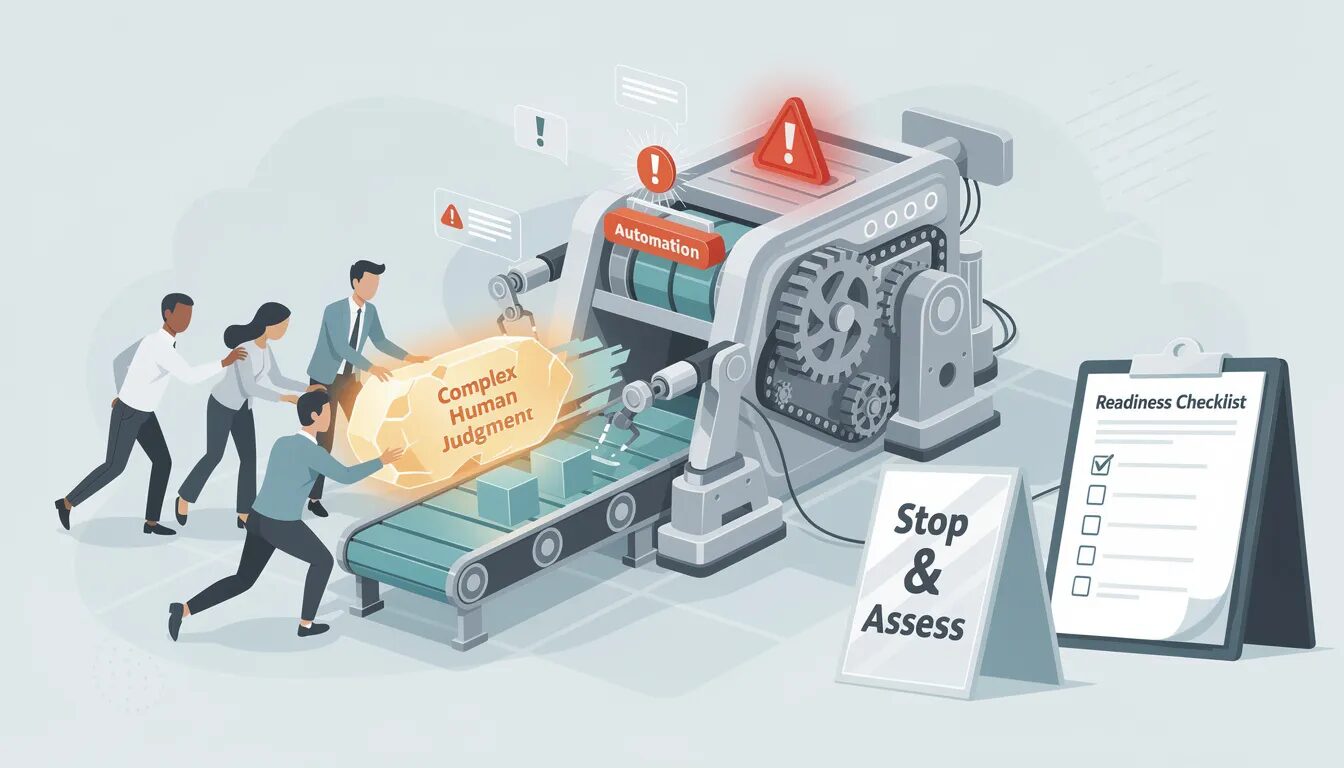
While automating business processes offers significant advantages, there are common mistakes that can undermine the success of automation initiatives. One frequent error is automating tasks without thoroughly assessing their suitability—some processes may be too complex, variable, or dependent on human judgment to benefit from automation. Careful evaluation is essential to ensure that only the right processes are targeted.
Another pitfall is neglecting employee training and support. Without adequate preparation, staff may resist new automated processes, leading to reduced productivity and lower morale. It’s crucial to involve employees early, provide clear communication, and offer ongoing training to facilitate adoption.
Underestimating the complexity of automation initiatives is another common mistake. Automation projects often require careful coordination across departments and integration with existing systems. Failing to account for these factors can result in delays, cost overruns, and diminished benefits.
Additionally, automating processes in isolation—without considering the broader business context—can create inefficiencies or negatively impact customer satisfaction. Automation should be approached holistically, with a focus on how changes will affect the entire organization and its customers.
Finally, businesses should be mindful of potential risks such as job displacement. Proactively addressing these concerns through retraining and upskilling programs helps ensure that automation delivers positive outcomes for both the organization and its workforce.
By avoiding these common mistakes, businesses can ensure that their automation initiatives achieve the desired improvements in efficiency, cost savings, and customer satisfaction.